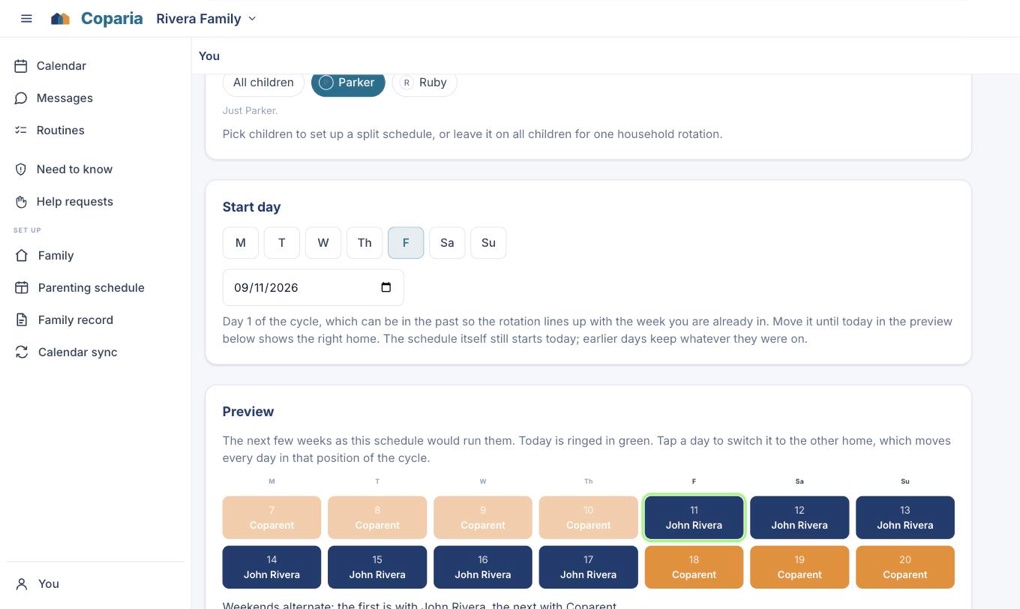
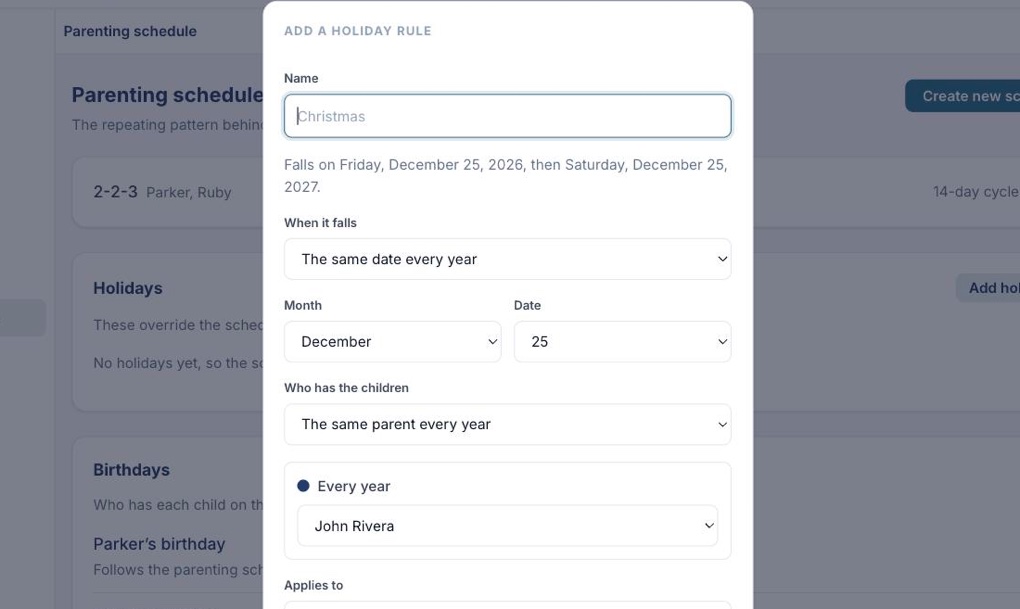
Week on / week off, 2-2-3, 2-2-5-5 or every other weekend. Pick the one your arrangement is called, choose the day it turns over, and watch the preview line up before you save anything. If yours has its own shape, draw it.
The preview updates as you change the handover day, so you can check it against the real thing.
A schedule can cover every child or just one, for families where the arrangements differ.
Every handoff gets a time, a location and a reminder to both parents, so nobody misses one.
Revising a plan starts the new one from a date. It never rewrites what already happened.
Parenting schedule
See it whole
Whose week it is, and what is in it.
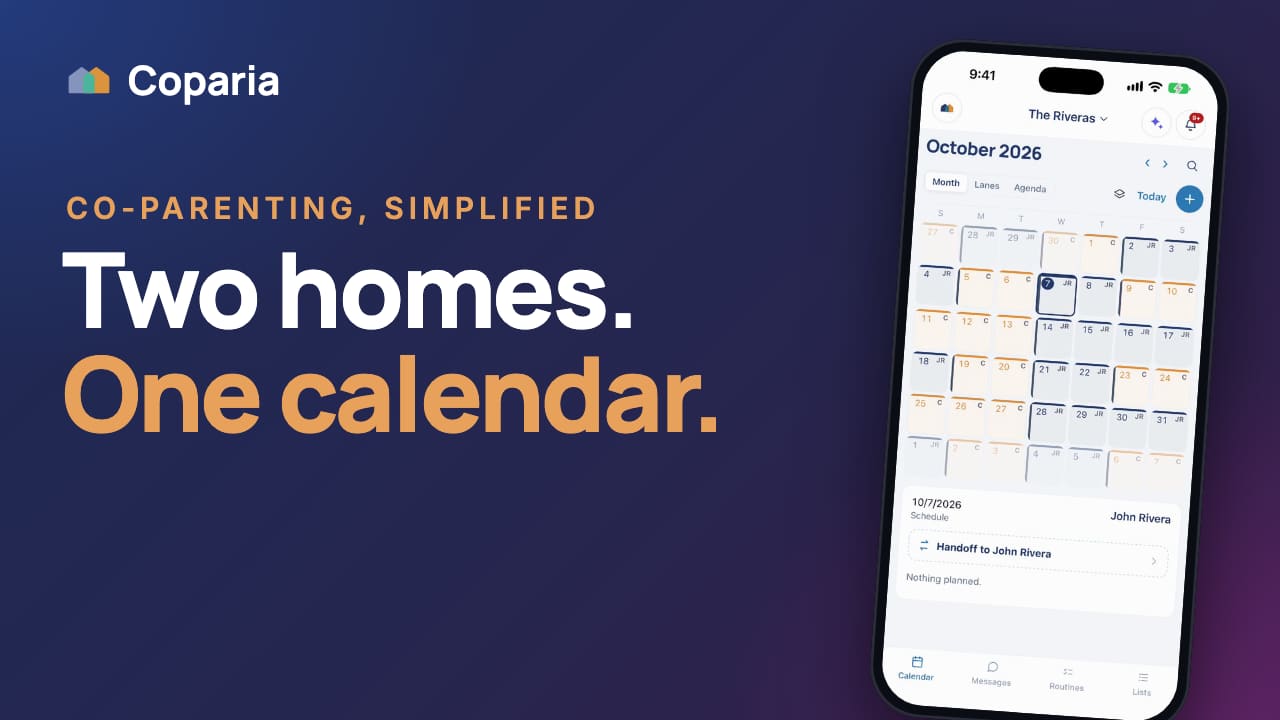
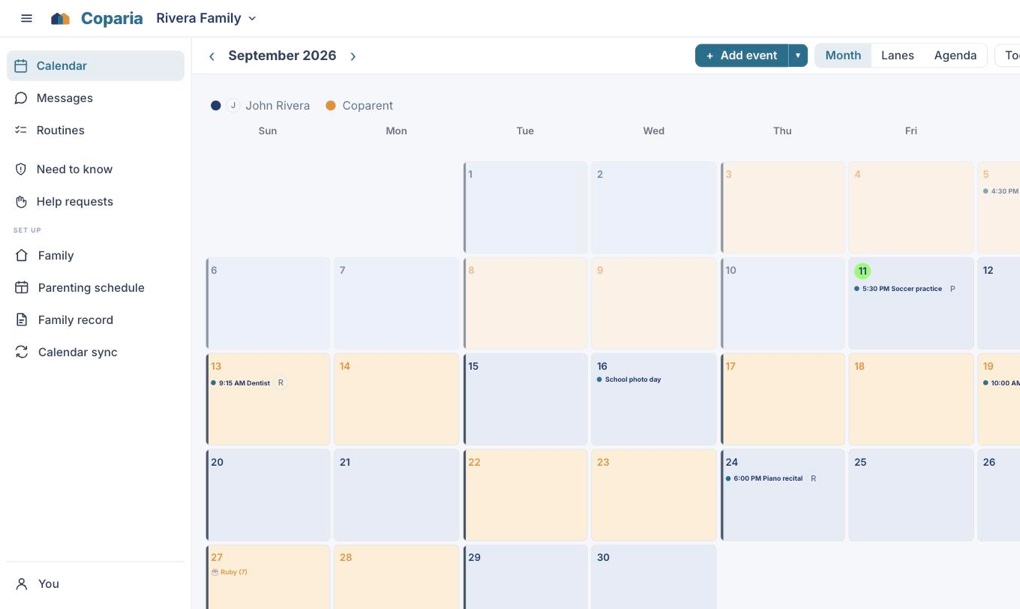
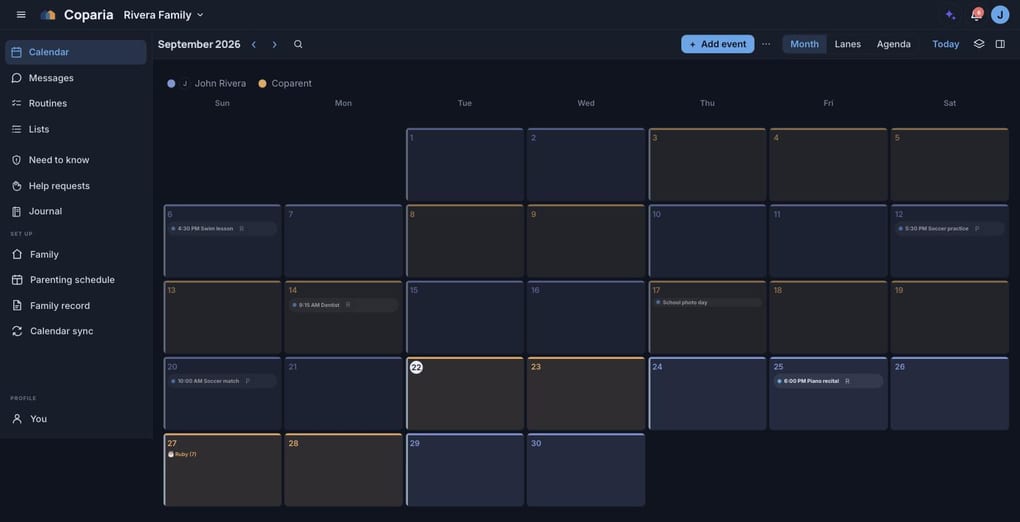
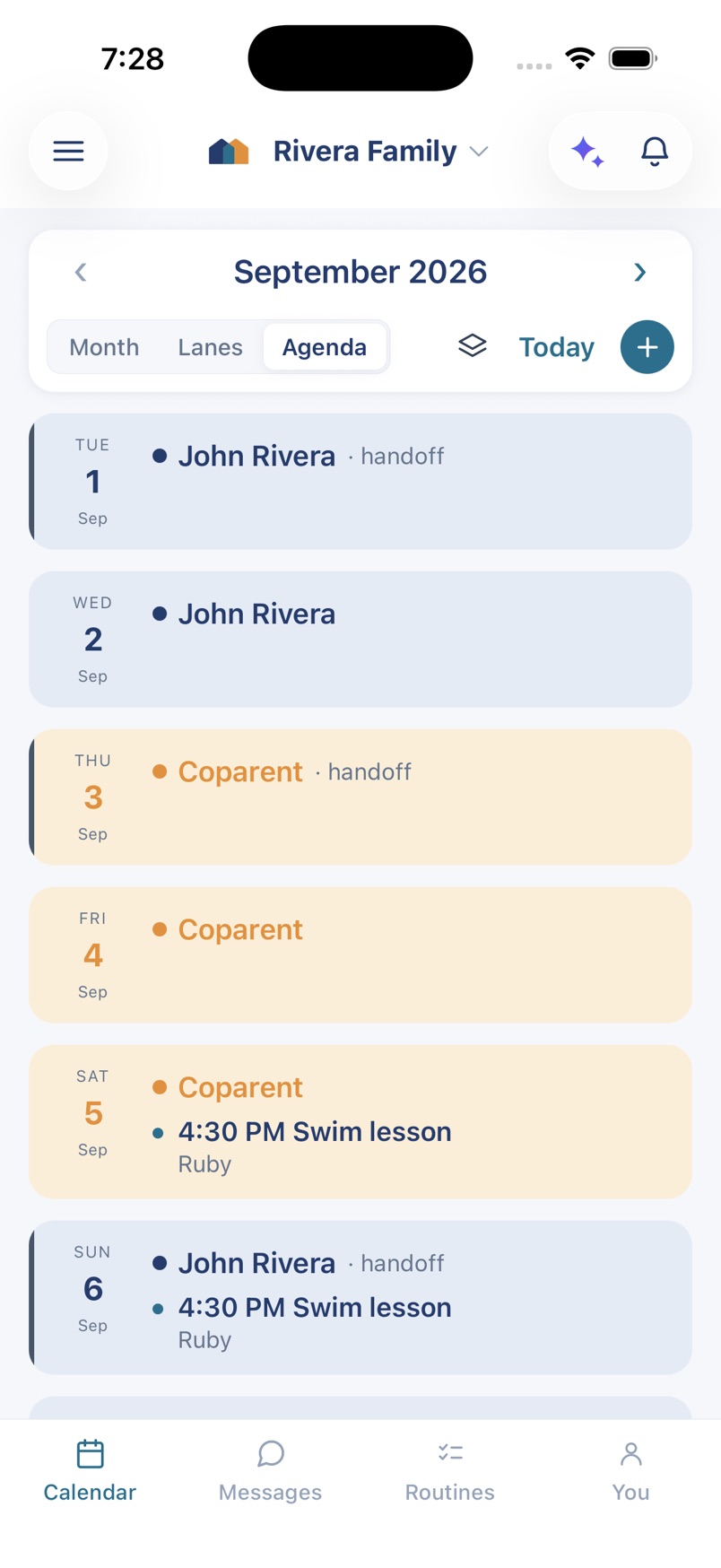
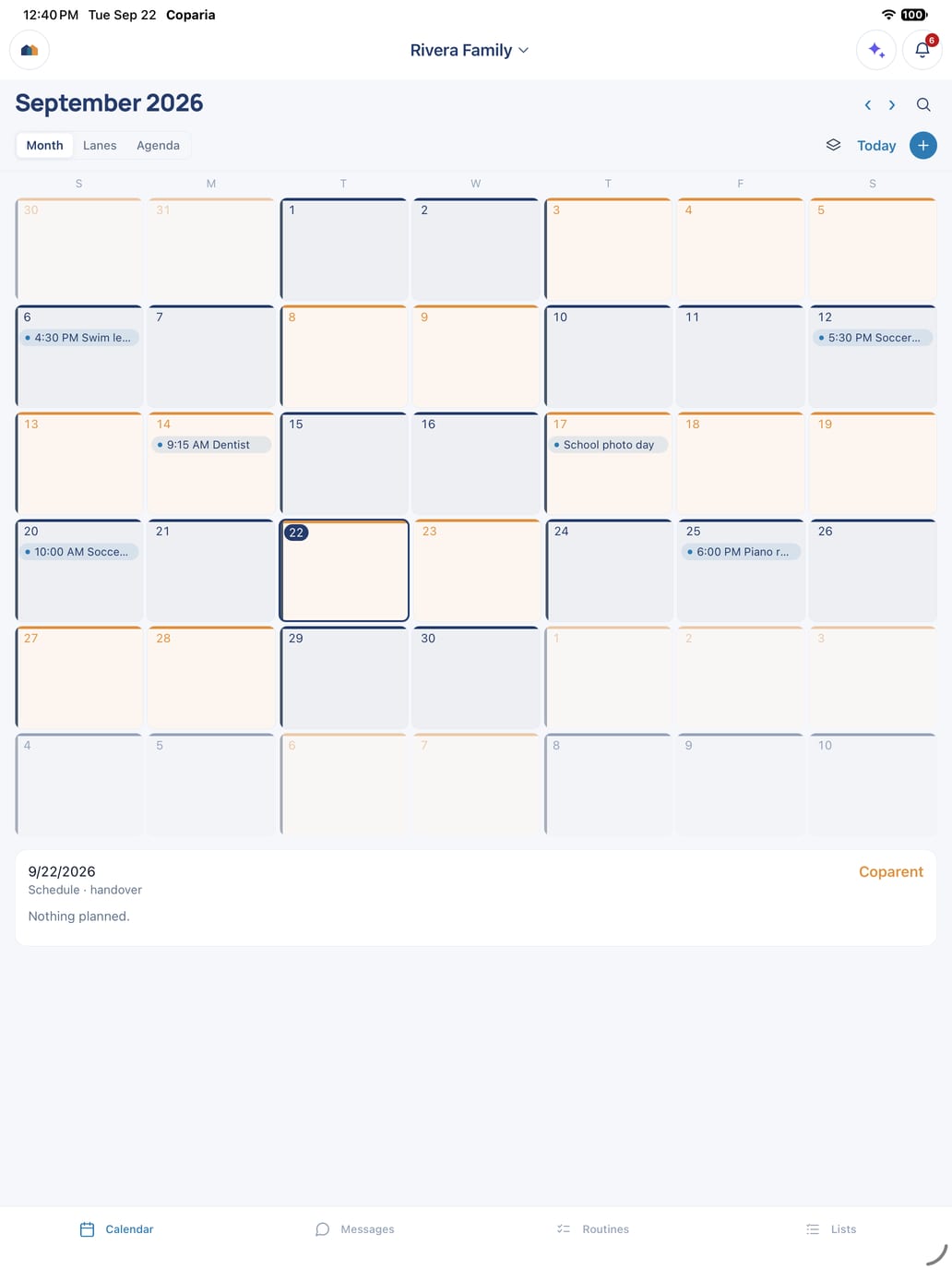
One calendar for both households. The parenting schedule runs underneath as a color, so you can see the shape of the month at a glance, and everything scheduled sits on top of it.
Month, lanes or agenda, whichever way you think about time.
Children wear their own avatar, so you can pick out whose activity is whose without reading.
Changes appear for the other parent as they happen, without a refresh.
Calendar
Put it down once
The dentist, and who is driving.
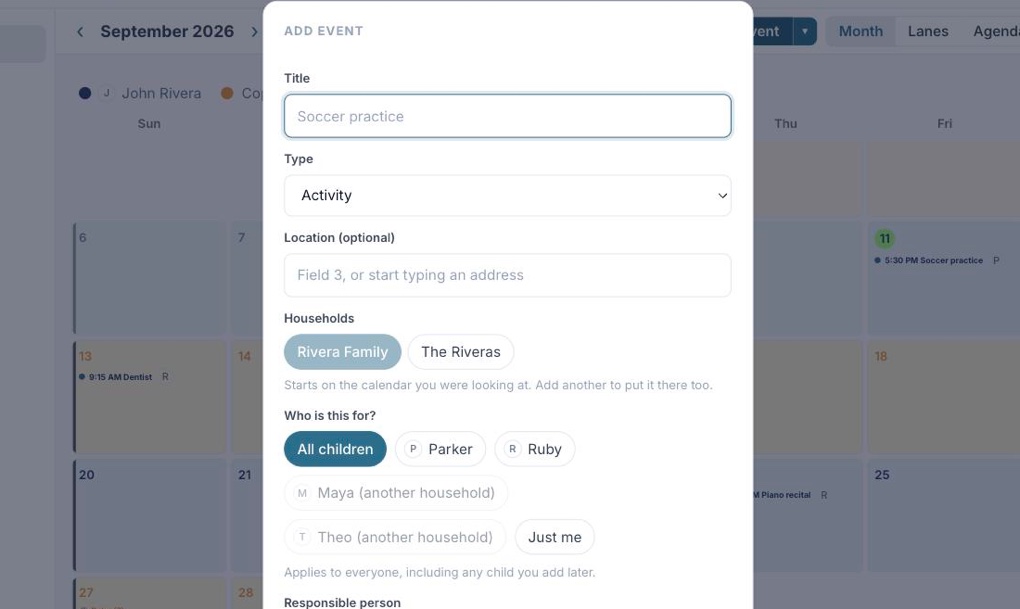
An event carries the things that actually get argued about later. Which children it is for, who is responsible for it, where it is, and when to be reminded.
Name a parent as responsible, and optionally give them the day itself in the same step.
Repeat it weekly, every other week, monthly or yearly, then change or cancel a single occurrence without touching the rest.
Start typing a location and the address completes itself.
New event
The evening, done
The bedtime list, done in both houses.
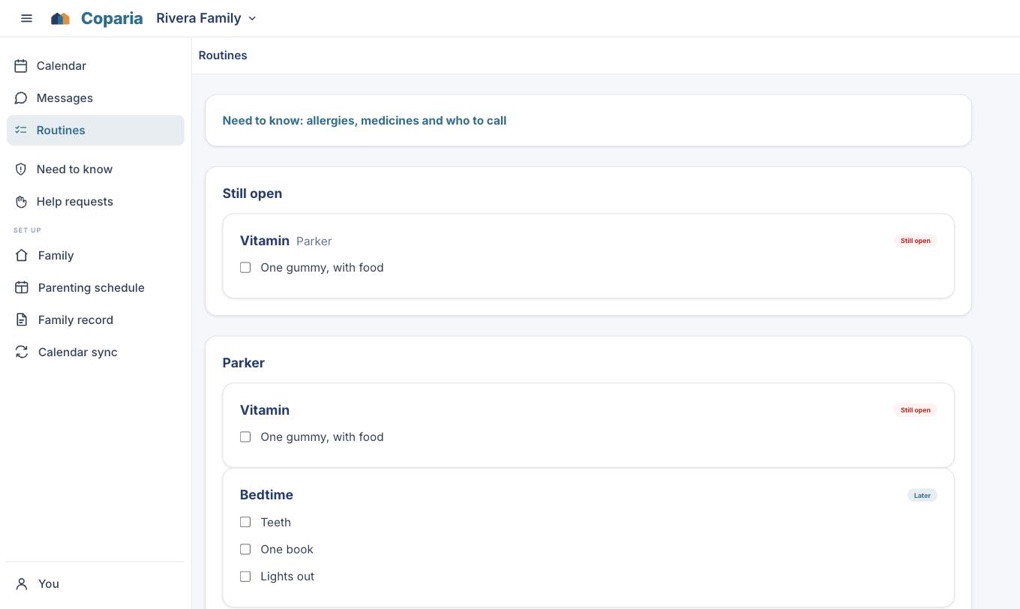
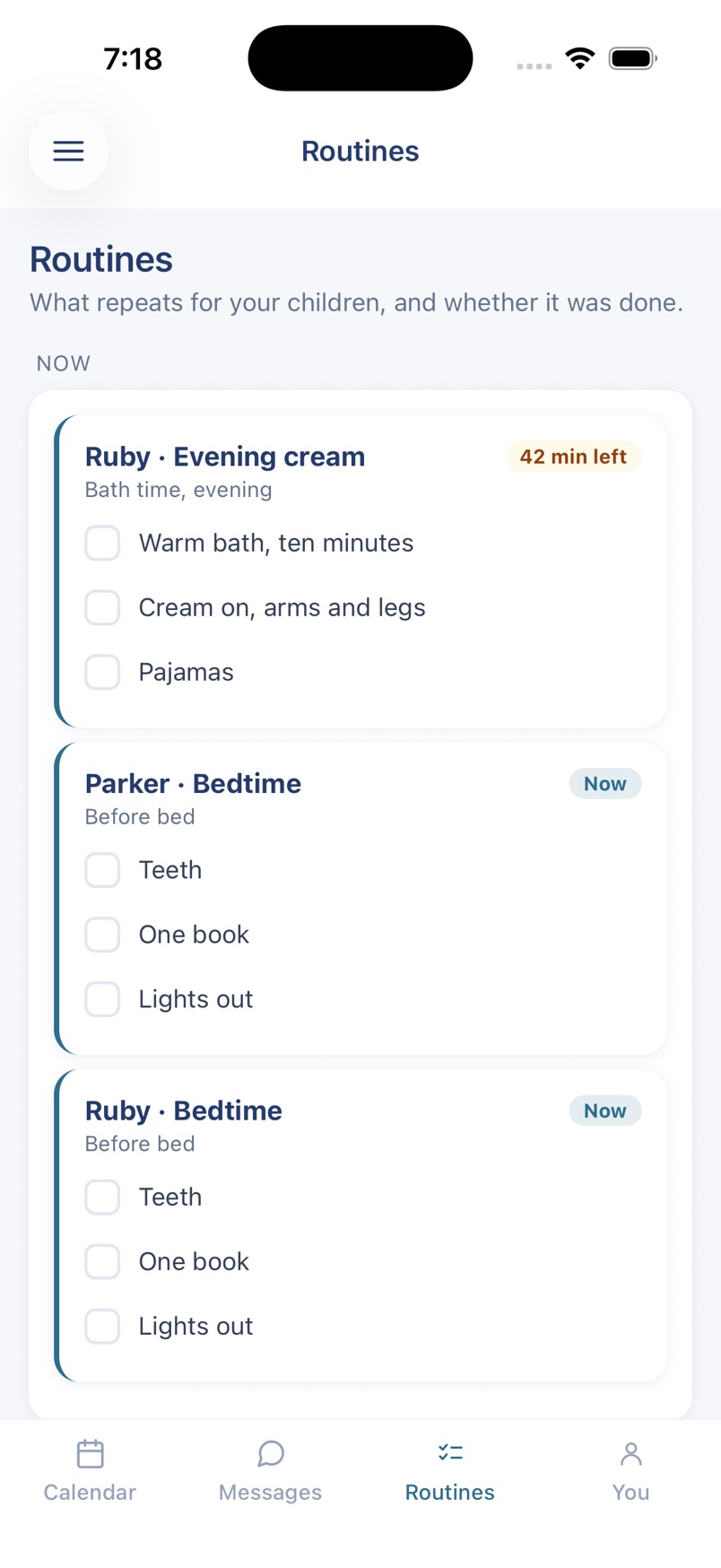
Medicine at eight. Cream after the bath. Twenty minutes of reading. The things that repeat every single day and get lost in the handover between two homes. Coparia keeps them as a checklist, per child, per day, so whoever is with them can see what is left without phoning to ask.
What is due right now sits at the top, because somebody opens this at half past seven holding a wet child.
Ticked per child, so one child's bath is never the other's, and both houses are looking at the same list.
Due at "before bed" or "with breakfast" rather than at 20:00. A routine pinned to a clock is late every night for a child who goes to bed at half past.
Routines
Before anybody has to ask
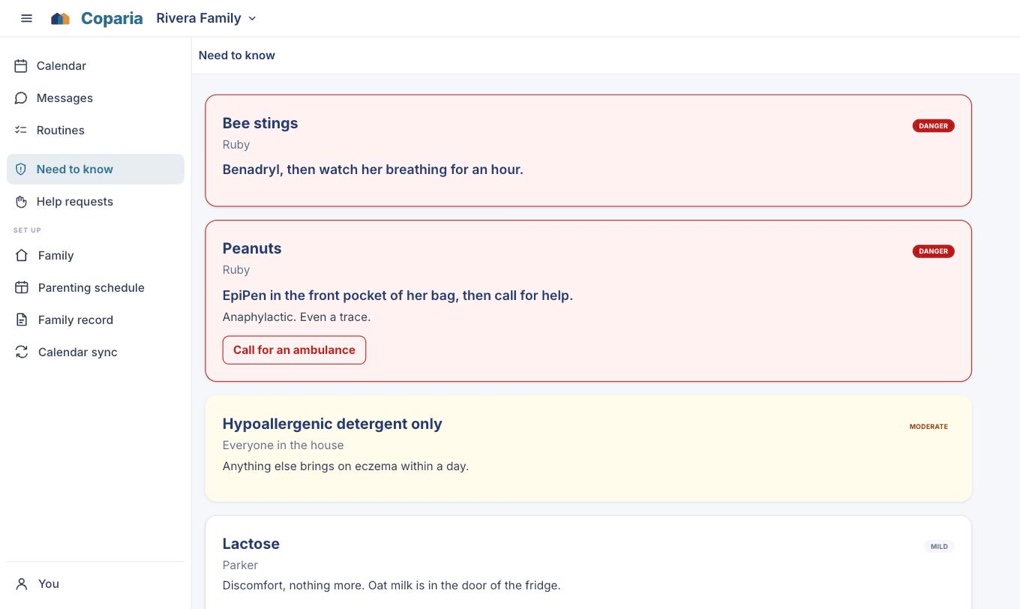
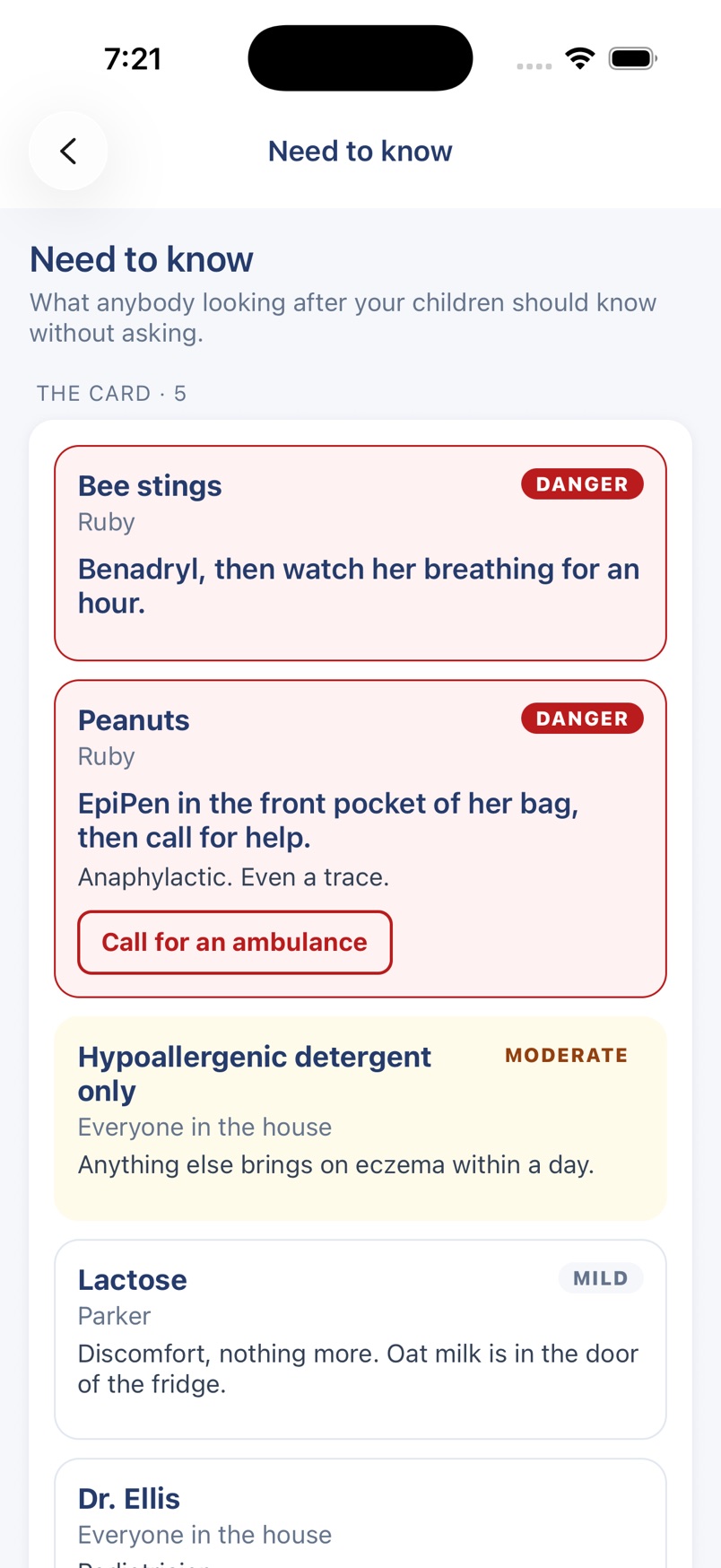
Allergic to peanuts. Readable in ten seconds.
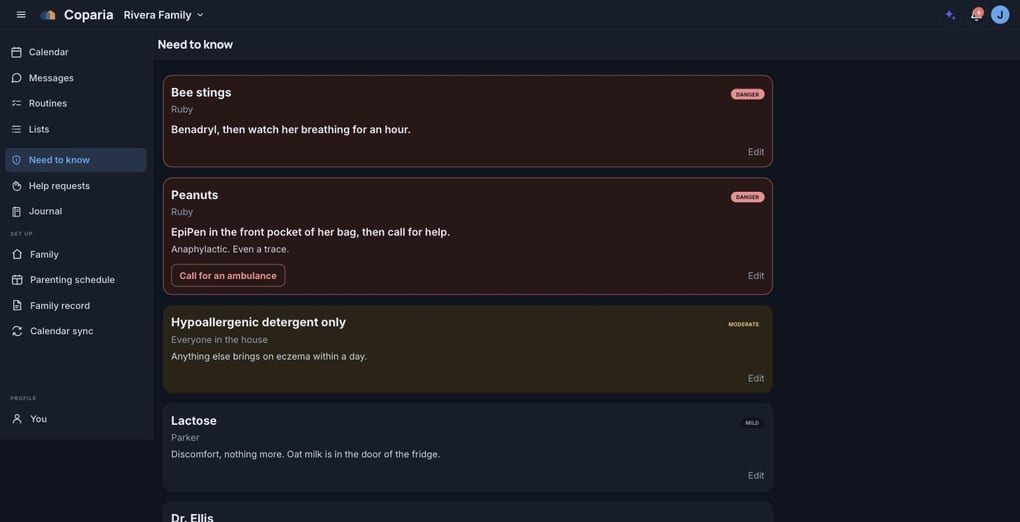
The standing facts about a child that anybody caring for them has to have, on one card. Allergies, intolerances, medications, the products you use and who to call. Written once by a parent, and readable by a grandparent or a sitter who has never opened this app before.
The most serious thing is first, and only a real danger is drawn loudly. A card where everything shouts is a card that gets skimmed, and the entry that gets skipped is the one that mattered.
Every entry says what to DO, not only what is wrong. "EpiPen in the front pocket of her bag, then call for help" is the line that helps somebody who is frightened.
A sitter can read it. Only a parent can change it. It is never hidden from the person looking after your children.
Need to know
Stop typing them in
Photograph the roster. Keep the dates.
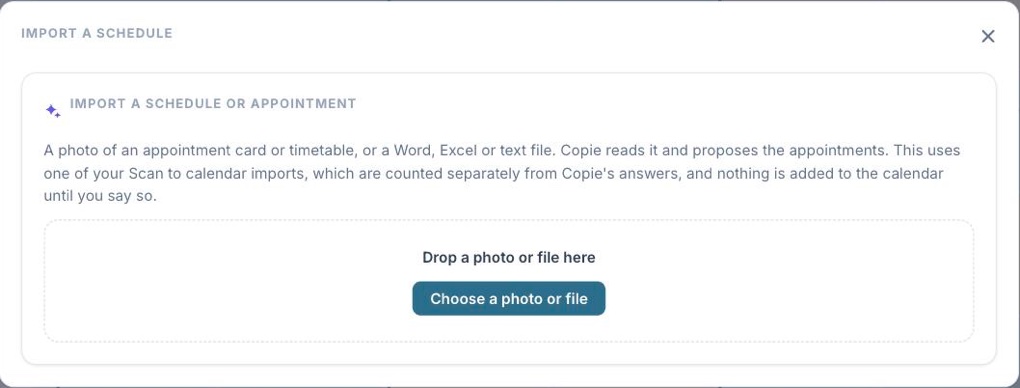
A practice schedule on a flyer, a term calendar photographed off a noticeboard, a spreadsheet from a coach. Coparia reads the dates out of it and proposes the events, and you keep the ones you want.
Photos and Word, Excel or text files. A phone photo is shrunk before it is sent, so there is nothing to do first.
What comes back is a draft in the ordinary event form. Nothing reaches the calendar until you save it.
Counted separately from the assistant, so reading a schedule never costs you a question.
Import events
Who paid for what
Every receipt, and who paid it back.
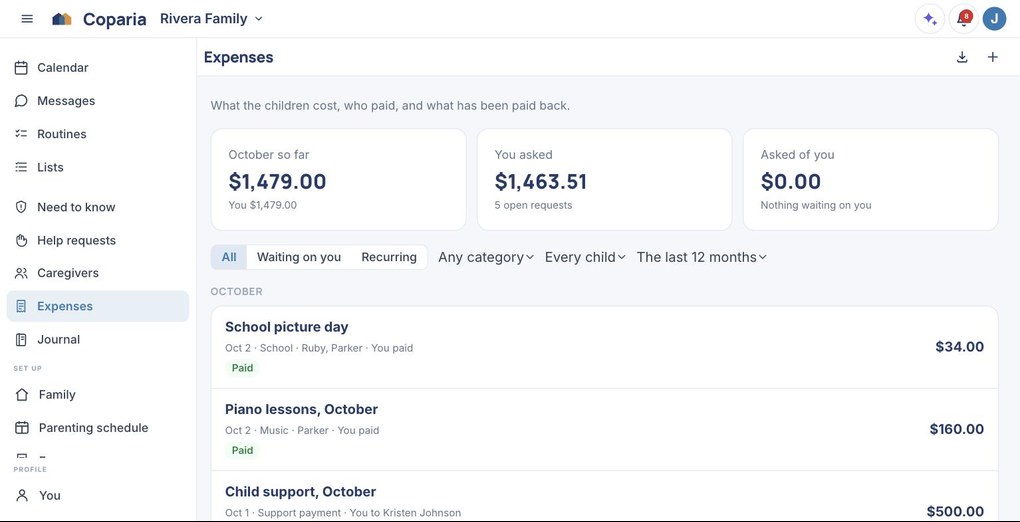
Record what the children cost, who paid and how you split it. Ask the other parent for their share and see whether they paid it back. At the end of the month, one statement gathers the shared expenses into a single request. Coparia keeps the record; it never moves money.
The totals are what each of you asked for, never a balance Coparia worked out on its own.
Photograph a bill or share a PDF, and the expenses are drafted for you to check, with the provider's Tax ID kept for tax time.
Download any month as a PDF. On Plus.
Expenses
The hard part
Holidays and birthdays, decided in advance.
The dates that cause the most trouble are the ones nobody wants to negotiate twice. Set the rule once and the calendar keeps it.
Thanksgiving is the fourth Thursday of November, not a date you re-enter every year.
A holiday can alternate by year, so it changes hands on its own and neither parent has to remember whose turn it was.
A child's birthday works the same way, for that child or for all of them.
Holiday rules
The rest of it
People who help
A grandparent or a sitter can be a helper rather than a parent. They see what they need to and nothing more, and whether they can see the parenting schedule at all is your choice. They can check off a routine and read what a child is allergic to without ever seeing a message between the two of you.
Ask for cover
Flag an event you cannot make. Your helpers hear about it, and the first one to accept becomes responsible for that day only. Nobody is left guessing whether somebody is coming, and the day goes back to normal afterwards.
Swap a week
Ask the other parent for a night or a week, and the calendar changes only if they agree. The swap is recorded against the days it moved, so in six months there is an answer to what happened rather than two memories of it.
Lists both homes can see
The shopping run, the bag for the weekend at the other house, what a birthday still needs. Anyone in the family can add an item and check it off, a checked item stays where it was written rather than sinking out of sight, and a list can be private when it is only yours.
Messages, kept together
Conversations sit with the calendar they are about, so arranging a swap does not happen in a text thread nobody can find later. On Plus, search goes back through all of it, and a draft you started and did not send is still there tomorrow.
Told, not buried
Choose what reaches you in the app, by email or as a push, and take a digest daily, weekly or monthly. Or turn the lot off. A separating family does not need another app competing for attention.
An assistant that reads your calendar
Ask what is happening on Thursday, or when the children are next with you for a full weekend. It answers from your own calendar rather than from the internet, and when it proposes an event it hands you a draft to check instead of saving anything itself.
Works with the calendar you already use
On Plus, subscribe to Coparia from Google Calendar, Outlook or Apple Calendar and the parenting schedule appears beside your work diary. Follow a school or a club calendar the other way, and share a read-only link with somebody who does not need an account.
Your record, yours to take
Download the whole family record whenever you want it: the calendar, the schedule, the history of who had the children and when, and the expenses. A PDF for a person or a court, and JSON for a program. Free on every plan, because a record you cannot take out is not really yours.
Light or dark
Easy on the eyes after bedtime.
Coparia follows your device, so when your phone or your laptop turns dark in the evening, the calendar does too. You can also choose for yourself, and each device keeps its own choice. The two home colors lift so they still read against the dark ground. Nothing about who has the children changes, only how it is drawn.
Calendar
Need to know
On Google Play
The same calendar, in your pocket.
The app is on Google Play for Android. The iPhone and iPad app is coming, and is in review with the App Store. The calendar, messages, routines and the Need to know card, built natively rather than a web page in a frame. On an iPad it lays out for the larger screen rather than stretching the phone.
iPhone
The month, banded by home
iPhone
Tonight's routines
iPhone
Need to know
iPad
On iPad, given the room
Questions people ask
How do two households share one calendar?
Coparia gives both parents the same calendar, with the parenting schedule running underneath it as a color, so each day shows which home the children are in. Both parents see changes as they happen. Events carry the things that get argued about later: which children they are for, who is responsible, and where.
How do you keep a child’s routine going across two homes?
Coparia keeps routines as a checklist per child per day, so medicine at eight, cream after the bath and twenty minutes of reading are checked off in whichever house the children are in that night. What is due now is lifted to the top of the list. A routine is due at a part of the day, such as before bed or with breakfast, rather than at a clock time that is wrong for a child who goes to bed at half past. Routines are part of the Plus plan.
Can both homes share a shopping list?
Yes. A list in Coparia belongs to the family: the shopping run, the bag for the weekend at the other house, what a birthday still needs. Anyone in the family can add an item and check it off, and a checked item stays where it was written rather than sinking out of sight, so the list reads the way it was made. A list can be marked private when it is only yours. The Free plan includes one list; Plus has no limit.
How do I make sure a babysitter knows about a child’s allergy?
Coparia keeps the standing facts about a child on one card called Need to know: allergies, intolerances, medications, the products the family uses, and who to call. The most serious entry is first, every entry says what to do rather than only what is wrong, and anybody caring for the children can read it. Only a parent can change it, and it is never hidden from a helper.
How do co-parents keep track of shared expenses for the children?
Coparia keeps a shared record of what the children cost: what was spent, who paid, and how the parents split it, by percent or by a fixed amount. The parent who paid can ask the other to pay back their share, and the other parent answers that they paid it back or that they do not agree. At the end of the month, one statement can gather every shared expense into a single request. Coparia records payments and never moves money, and it never works out on its own who owes whom. Expenses are part of the Plus plan, and a family that leaves Plus can still read and download everything it recorded.
Can a grandparent or a babysitter see the calendar?
A grandparent or a sitter can be added to Coparia as a helper rather than as a parent. A helper sees what they need to and nothing more, and whether they can see the parenting schedule at all is the parents’ choice. Helpers can check off routines and read the Need to know card without seeing messages between the parents.
Does Coparia work with Google Calendar, Outlook and Apple Calendar?
Yes, on the Plus plan. Coparia publishes a calendar feed that Google Calendar, Outlook and Apple Calendar can subscribe to, so the parenting schedule appears beside a work diary. Coparia can also follow a school or club calendar the other way, and a read-only link can be shared with somebody who does not have an account.
Is there a Coparia app for iPhone and Android?
Coparia is on Google Play for Android. The Coparia app for iPhone and iPad is in review with the App Store and is not in the store yet; until it is, Coparia runs in Safari on an iPhone or iPad and can be added to the home screen.
Can I get my family’s records out of Coparia?
Yes, on every plan and at any time. Coparia exports the whole family record: the calendar, the parenting schedule, and the history of which parent had the children on which days. It comes as a PDF for a person or a court, and as JSON for another program.
Start with the rotation you already have.
Setting up takes about five minutes. Name your family, add the children, pick the rotation, and invite the other parent when you are ready.