Help / Getting started
Holidays and special days
A holiday rule beats the parenting schedule on the day it names. Set it once and it applies every year, so nobody has to remember in November what was agreed in March.
Before you start. Create the parenting schedule first. A holiday rule is an exception to it.
Holiday rules are part of Coparia Plus. The free plan does not include them, so if you are on the free plan the steps below stop at the last one. Rules you have already made keep working if a plan ends: the calendar still applies them, every year, and swapping individual days is free on every plan.
Add a holiday
- Open Settings.
- Select Parenting schedule.
- Under Holidays, select Add holiday.
- Start typing the name. Common holidays are offered, so you do not have to work out that Thanksgiving is the fourth Thursday in November.
- Choose who has the children that day.
- Save.
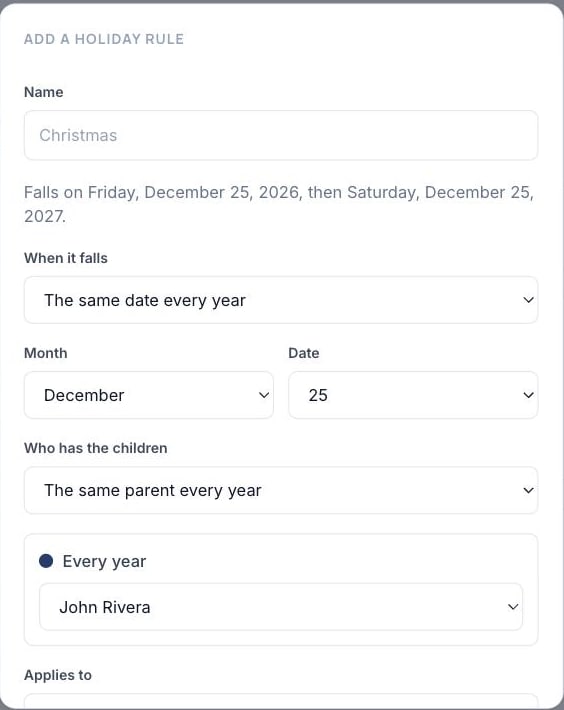
The calendar updates for every year, past and future.
Holidays that alternate year to year
Choose the alternating option rather than one parent. Coparia works out which year is which, so “mine on even years” stays right without anybody counting.
Holidays that move
Some holidays are not on a fixed date or a fixed weekday. Easter follows its own calculation, and Hanukkah follows the Hebrew calendar. Those are named in the list but cannot be picked yet.
For now, put those days in by swapping the individual days on the calendar (Swap a day). It is more work once a year, and it is honest about what the app can promise.
Birthdays
Birthdays are on the same page, listed per child, and they work the same way, with one difference that matters: birthday rules are free on every plan. A birthday is a fact about your child that you have already told us, so it is not something to charge for. By default each birthday follows the rotation. See add your children.
When it does not work
The holiday did not change the calendar. Check the rule covers the right children. A rule made for one child leaves the others on the ordinary rotation, which is sometimes what you want and sometimes a surprise.
You want a holiday for one year only. Do not add a rule. Swap the individual days on the calendar instead, so next year is unaffected.
Open this in Coparia, where you can search every article and ask about your own calendar.