Help / Everyday use
Set up a routine and check it off
A routine is the part of a day that repeats: teeth, one book, lights out. You write the steps once, and every day they appear as something to check off.
The point is the handoff. A parent who has not seen a child since Thursday can look at what was ticked, rather than sending a message asking whether the cream went on.
Write one
- Open Routines.
- Select Add a routine.
- Give it a name, choose who it is for, and add the steps.
A routine can be for one child, for several, or for the whole family. Leave the children unselected and it belongs to everybody in the family, which is right for something like a bedtime that runs the same way whoever is in the house.
Steps are separate lines on purpose. “Bath, cream, pajamas” as one step is one tick for three things, and half done is the state somebody actually hands over in.
Say when it happens
Rather than a clock time, a routine is usually tied to a moment in the day: Before bed, With breakfast, After school, Bath time, evening, and so on. There is also At a set time if a particular hour is what matters, and Any time today for something that only has to happen.
An anchor travels better than a time. “Before bed” means the same thing in both houses, where 7:30 means one house’s bedtime and not the other’s.
Get a reminder
A routine can remind everybody in the family, and it starts switched on when you write one. The time comes from the part of the day you chose: before bed reminds in the evening, with breakfast reminds in the morning.
Move it to whatever suits your house, or switch Remind me off for a routine that does not need one. Changing the part of the day moves the reminder with it, unless you have set a time yourself.
The time is read in each person’s own time zone, so two parents in two places each get theirs at the same point in their own evening.
You can also turn routine reminders off for yourself, whatever each routine says, under Settings, then Notifications. That switch is separate from the one for calendar reminders, so you can keep the dentist and lose bedtime. See choose what Coparia tells you about.
Check things off
Today’s routines are listed under Now when they are due, with each step its own tick box.
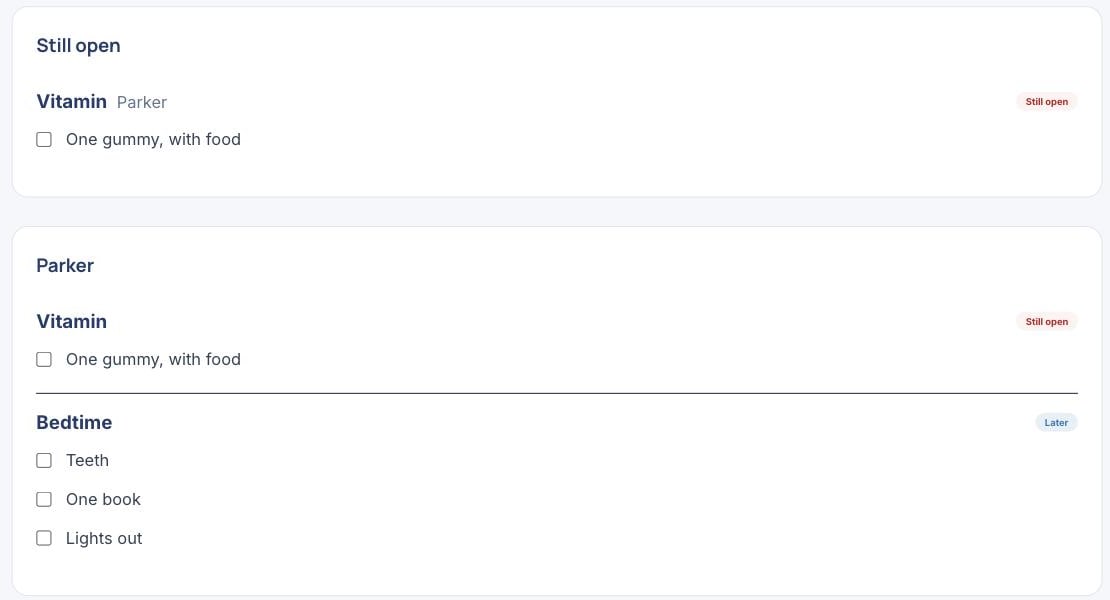
Ticks are per child, per step, per day. Two children on one bedtime routine are tracked separately, so one being done does not quietly mark the other.
A tick is attached to the step rather than to its position in the list, so editing a routine later does not move yesterday’s ticks onto different steps.
Underneath the day’s board, All routines lists every routine you have, with the part of the day it belongs to and who it is for. Two routines can share a name honestly that way: a medicine with breakfast and the same medicine at bedtime are two routines, and the list says which is which.
Keep one to the parents
A routine can be marked private, and private means every helper, without exception.
This is stricter than it is for an event, and deliberately so. A private event is still visible to the helper it is assigned to; a routine has nobody to carve out. The case it exists for is something like a medication that a sitter has no business reading.
A Parents only routine is also never shown on a child’s own device in Child mode. Every other routine for that child is, and they can check its steps off themselves. See set up your child’s own iPad or phone.
A private routine is hidden completely rather than shown with its detail blanked. A card reading “private routine, 3 steps” would tell a helper something is being kept from them about a child they are looking after, which is worse than silence.
Who can see and change them
Everybody in the family can see the routines and check them off, helpers included. That is the whole point of them.
Writing routines is part of Coparia Plus. Reading them never is, and a family whose plan changes keeps the routines it already wrote: the board still draws, the boxes still tick, and nobody caring for a child that evening is told anything is missing.
Ticks are a record as well as a checklist. The Family record download can include them, so the question “was the medicine given every evening in March” has an answer that is not somebody’s memory: it lists every step that was due on each day, whether or not it was ticked.
One thing that record cannot tell you: clearing a tick leaves no trace. A step ticked and then unticked reads exactly like one that was never ticked.
See also what anybody looking after your children should know, for the standing facts that are true every day rather than the things that repeat, and keep a private journal for a note only you can read.
Open this in Coparia, where you can search every article and ask about your own calendar.